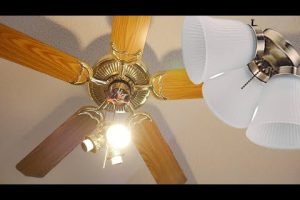
If you have ever walked into a room and fumbled for a pull chain in the dark, you already know how essential a reliable ceiling fan light switch really is. Whether you are upgrading an older fixture, installing a brand-new ceiling fan with light kit, or simply trying to understand why your fan light refuses to turn on, the switch matters more than most homeowners realize. A ceiling fan light switch is not just a simple on-off mechanism — it is the control point that governs comfort, ambiance, and energy efficiency in your living space. In this comprehensive guide, we will walk you through everything from the different types of switches available to wiring tips, troubleshooting advice, and expert recommendations that will help you make the best decision for your home.
What Is a Ceiling Fan Light Switch?
A ceiling fan light switch is the electrical component — either a built-in mechanism on the fixture or a wall-mounted device — that controls the operation of the light function on a ceiling fan. Unlike standard light switches that only manage a single circuit, fan light switches often need to handle two separate circuits: one for the fan motor and one for the light assembly. Understanding how these switches work and the different configurations available can save you time, money, and frustration. The term ceiling fan light switch covers a broad range of devices, from traditional pull chains to modern smart switches that integrate with home automation ecosystems.
Types of Ceiling Fan Light Switches
Not all switches are created equal, and choosing the right type depends on your wiring setup, lifestyle preferences, and budget. Below are the most common switch options you will encounter.

Pull Chain Switches
The pull chain switch is the most traditional option. It hangs from the fan body and requires you to physically tug the chain to cycle through settings — typically off, low, medium, high, and light on. Many older fixtures rely exclusively on pull chains, which makes them easy to install but less convenient for everyday use.
Wall-Mounted Switches
Wall-mounted switches replace pull chains with a more polished, modern look. These are installed at the wall and control the fan and light independently or in combination, depending on the wiring configuration. A ceiling fan light wall switch setup often uses a single-pole or three-way switch arrangement, giving you flexibility from the room’s entry point.

Remote Control Switches
Remote control switches come with a handheld receiver that communicates wirelessly with the fan. These are incredibly popular because they let you adjust fan speed and light brightness from the comfort of your couch. Most remote kits include a receiver module that replaces the existing switch or integrates directly into the fan housing.
Smart Switches and Wi-Fi Enabled Options
Smart switches represent the cutting edge of ceiling fan light control. Devices like the Lutron Caseta or Hunter Douglas PowerView allow you to control your fan light through a smartphone app, voice commands via Alexa or Google Assistant, or automated scheduling routines. These switches require a neutral wire in most cases and may need a professional electrician for installation.
How to Choose the Right Ceiling Fan Light Switch
Selecting the correct switch involves evaluating several factors that go beyond aesthetics. Here is what you should consider before making a purchase.
- Wiring Compatibility: Check whether your electrical box supports a neutral wire, a ground wire, and sufficient amperage for the fan and light combined.
- Switch Rating: Make sure the switch is rated for the total wattage of your light kit. LED kits draw far less power than incandescent bulbs, so older switches may handle modern LEDs without issue, but always verify the rating.
- Dimming Capability: If you want adjustable light levels, choose a switch that supports dimming. Not all fan-compatible dimmers work smoothly with LED light kits, so look for LED-compatible dimmer switches.
- Control Method: Decide whether you prefer a physical switch, a remote, or app-based control. Remote switches add convenience but require battery maintenance.
- Brand Compatibility: Some fan manufacturers design switches specifically for their models. Always verify compatibility before purchasing a replacement switch.
Wiring a Ceiling Fan Light Switch: Step-by-Step
Wiring a ceiling fan light switch requires basic electrical knowledge and strict adherence to safety protocols. If you are uncomfortable working with electrical wiring, hire a licensed electrician. For those comfortable with DIY projects, here is a general overview.
What You Will Need
- Screwdriver set (flathead and Phillips)
- Voltage tester
- Wire stripper
- Electrical tape
- Wire nuts
- The appropriate switch (single-pole, three-way, or fan-speed regulator)
Step-by-Step Process
- Turn off the power: Switch off the breaker at the panel and use a voltage tester to confirm the circuit is dead.
- Remove the existing switch: Unscrew the faceplate, disconnect the wires, and note their positions — photograph the setup before disconnecting anything.
- Identify the wires: Typically, you will find a black (hot), white (neutral), and green or bare copper (ground) wire.
- Connect the new switch: Attach the black wire to the brass terminal, the white wire to the silver terminal, and the ground wire to the green terminal.
- Secure and test: Tuck the wires back into the box, mount the switch, restore power at the breaker, and test the switch operation.
Common Ceiling Fan Light Switch Problems and How to Fix Them
Even the best switches can develop issues over time. Here are the most common problems and their solutions.
- Light works but fan does not: This usually indicates a faulty fan-speed capacitor or a loose wire connection at the switch. Use a voltage tester to check continuity.
- Switch clicks but nothing happens: A dead breaker, tripped GFCI outlet, or burnt-out contacts inside the switch could be the culprit. Reset the breaker first, then inspect the switch.
- Flickering light: Incompatible dimmer switches or loose wiring connections often cause flickering. Switch to an LED-compatible dimmer or tighten all wire nuts.
- Remote control stops responding: Most remote switches have a “learn” or “pair” button. Press it to re-sync the remote with the receiver module. Replace batteries if the remote is unresponsive.
- Switch gets warm or buzzing: This is a sign of overloaded wiring or a defective switch. Turn it off immediately and replace it before it becomes a fire hazard.
Expert Tips for Ceiling Fan Light Switch Maintenance
Keeping your ceiling fan light switch in top condition extends its lifespan and prevents unexpected failures. Here are some expert recommendations that most homeowners overlook.
- Clean contacts annually: Dust and oxidation build up on switch contacts over time. Turn off the power and gently clean the terminals with a contact cleaner spray.
- Tighten connections periodically: Loose wire connections cause heat buildup and intermittent operation. Check terminal screws every six months.
- Replace switches every 10–15 years: Even if a switch still works, internal components degrade over time. Proactive replacement prevents sudden failures.
- Use the right bulb type: Always match your light kit with the recommended bulb type. Using bulbs that exceed the switch’s wattage rating accelerates wear and can damage the switch.
- Install a surge protector: Power surges can fry the internal electronics of smart switches. A whole-home surge protector adds an extra layer of defense.
Comparison Table: Ceiling Fan Light Switch Types
| Switch Type | Convenience | Installation Difficulty | Cost Range | Best For |
| Pull Chain | Low | Very Easy (Built-in) | $0 (included) | Budget setups, rental properties |
| Wall-Mounted | Medium | Moderate | $10 – $40 | Modern homes, convenience |
| Remote Control | High | Moderate | $20 – $80 | Comfort, bedroom fans |
| Smart Switch | Very High | Advanced | $40 – $150 | Home automation enthusiasts |
Conclusion
A ceiling fan light switch may seem like a small component, but it plays a disproportionately large role in your daily comfort. Whether you prefer the simplicity of a pull chain, the elegance of a wall-mounted switch, the convenience of a remote control, or the cutting-edge functionality of a smart switch, choosing the right option makes a tangible difference in how you interact with your living space. Always match your switch to your wiring configuration, verify compatibility with your fan model, and do not hesitate to consult a licensed electrician when in doubt. With the right switch in place, controlling your ceiling fan and light becomes effortless — turning every room into a more comfortable and inviting space.
Frequently Asked Questions
Can I replace a pull chain switch with a wall-mounted switch on my ceiling fan?
Yes, in most cases you can replace a pull chain switch with a wall-mounted switch, but you will need to ensure your electrical box has the correct wiring — typically a neutral wire and sufficient amperage. If your home has older wiring without a neutral wire, you may need to upgrade the circuit or use a switch designed for no-neutral installations.
Why does my ceiling fan light switch only work intermittently?
Intermittent operation is usually caused by loose wire connections, worn-out contacts inside the switch, or a failing capacitor in the fan motor. Start by turning off the power and checking all wire connections. If the connections are tight, replace the switch. If the problem persists, the issue may be internal to the fan itself.
What is the difference between a single-pole and a three-way ceiling fan light switch?
A single-pole switch controls the fan light from one location, while a three-way switch allows you to control the same fan light from two different locations. Three-way setups require a traveler wire in addition to the hot and neutral wires and are commonly used in hallways, master bedrooms, and living rooms where convenience demands multiple control points.
Do smart ceiling fan light switches require a neutral wire?
Most smart switches do require a neutral wire to maintain power to the switch’s internal electronics when the fan or light is off. However, several manufacturers now offer no-neutral smart switches designed specifically for older homes that lack a neutral wire in the electrical box. Always check your wiring before purchasing a smart switch.
Can I use a standard dimmer switch with a ceiling fan light kit?
You can, but only if the dimmer is compatible with LED light kits and fan motors. Standard incandescent dimmers often cause humming, flickering, or erratic fan speed when used with LED bulbs. Always look for switches specifically labeled as fan-compatible dimmers or LED-compatible dimmers to ensure smooth, reliable operation.