Cync smart bulbs have emerged as one of the most compelling options for homeowners and renters looking to elevate their lighting experience without the complexity typically associated with smart home devices. Developed under the C by GE brand, these bulbs combine the reliability of a decades-old lighting manufacturer with modern Wi-Fi connectivity, voice assistant integration, and intuitive scheduling features. Whether you are upgrading a single bedside lamp or rewiring your entire home for smart lighting, Cync smart bulbs deliver a balance of performance, design, and affordability that few competitors match. In this comprehensive guide, we will explore everything you need to know about Cync smart bulbs, from core features and setup to real-world comparisons, expert recommendations, and answers to the most frequently asked questions.
What Are Cync Smart Bulbs?
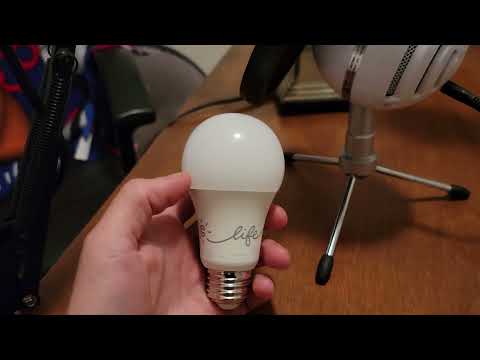
Cync smart bulbs are Wi-Fi-enabled LED light bulbs designed to work seamlessly with voice assistants such as Amazon Alexa, Google Assistant, and Apple HomeKit. Unlike many smart bulbs that require a separate hub or bridge, most Cync models connect directly to your home Wi-Fi network, eliminating an extra layer of setup and reducing potential points of failure. The lineup includes A19 bulbs, BR30 floodlights, and candelabra-style options, catering to a wide range of fixtures found in residential and light commercial environments. Each bulb supports millions of color options and adjustable white temperature settings, giving users the ability to shift from cool, energizing daylight to warm, relaxing amber tones with a simple tap or voice command.
Key Features and Technology Behind Cync Smart Bulbs
Understanding what makes Cync smart bulbs stand out starts with a closer look at the technology packed into each bulb. These features collectively create a lighting experience that feels intelligent without being overwhelming.
Direct Wi-Fi Connectivity
One of the biggest advantages of Cync bulbs is the absence of a required hub. Most competing brands, including Philips Hue, rely on a bridge device that connects to your router. Cync bulbs skip this entirely by using built-in Wi-Fi. This means fewer devices cluttering your network, lower upfront costs, and a simpler installation process. However, because they connect directly to Wi-Fi, users with larger homes may want to ensure their router coverage is robust enough to handle multiple bulbs across different rooms.
Voice Assistant Compatibility
Cync smart bulbs are certified to work with Amazon Alexa, Google Assistant, and Apple HomeKit. This broad compatibility ensures that users can choose the voice ecosystem that best fits their lifestyle. You can create routines where lights turn on at sunrise, dim automatically at bedtime, or respond to custom voice commands. The integration is native and reliable, with minimal latency between issuing a command and seeing a response.
Scheduling and Automation
Through the Cync app, users can set custom schedules, create scenes, and automate lighting based on time of day or location. The app supports away-from-home features that simulate occupancy, which is a practical security measure. Users can also group multiple bulbs into rooms or zones for unified control.
Energy Efficiency and Lifespan
As LED devices, Cync smart bulbs consume a fraction of the energy used by traditional incandescent bulbs. Most models are rated at approximately 9 to 10 watts while producing light output equivalent to a 60-watt incandescent. The expected lifespan ranges from 15,000 to 25,000 hours, translating to years of daily use without replacement.
Cync Smart Bulbs vs. Competing Smart Lighting Brands
When evaluating smart bulbs for your home, it is important to understand how Cync stacks up against popular alternatives. The table below provides a direct comparison of Cync against two widely recognized competitors.
| Feature | Cync by GE | Philips Hue | Wyze Bulb |
| Wi-Fi Built-In | Yes | No (requires hub) | Yes |
| Alexa Compatible | Yes | Yes | Yes |
| Google Assistant Compatible | Yes | Yes | Yes |
| Apple HomeKit | Yes | Yes | No |
| Hub Required | No | Yes | No |
| Color Options | 16 million | 16 million | White only (some models) |
| White Temperature Range | 2700K – 6500K | 2000K – 6500K | 2700K – 6500K |
| Approximate Price per Bulb | $12 – $18 | $15 – $50+ | $8 – $15 |
| App Name | Cync | Philips Hue | Wyze |

The Cync brand occupies a strong middle ground. It offers the direct Wi-Fi convenience of Wyze bulbs without sacrificing color-changing capabilities or Apple HomeKit support. At the same time, it is significantly more affordable than the Philips Hue ecosystem, especially when you factor in the cost of the Hue Bridge. For consumers who want a plug-and-play smart lighting solution with robust features, Cync smart bulbs represent excellent value.
Setting Up Your Cync Smart Bulbs: A Step-by-Step Guide
Setting up Cync smart bulbs is designed to be straightforward, but following a methodical process ensures the best experience from day one.
- Install the bulb: Screw the Cync bulb into any standard E26 socket and turn the wall switch on.
- Download the Cync app: Available on both iOS and Android, the Cync app serves as your central control panel.
- Create an account: Sign up using your email address and set a secure password.
- Add a device: From the app dashboard, tap “Add Device” and follow the on-screen prompts. The app will scan for nearby Cync bulbs.
- Connect to Wi-Fi: Select your home network and enter the password. Wait for the bulb to confirm its connection.
- Assign a name and room: Label each bulb by its location (e.g., “Living Room Lamp”) and assign it to a room for easier grouping.
- Enable voice assistants: Link Alexa, Google Assistant, or Apple HomeKit through the app settings to enable hands-free control.
Expert Tip: If your Cync bulb does not appear during the scan, try toggling the wall switch off and on rapidly to put the bulb into pairing mode. Also, ensure your smartphone is connected to the same 2.4 GHz Wi-Fi band, as most smart bulbs do not support 5 GHz networks.
Best Use Cases and Room-by-Room Recommendations
Cync smart bulbs are versatile enough to serve a variety of purposes throughout the home. Here are practical recommendations for each room.

- Living Room: Use Cync color-changing A19 bulbs to set the mood for movie nights, dinner parties, or quiet evenings. Warm white temperatures (2700K) create a cozy atmosphere, while vibrant colors can energize a gathering.
- Bedroom: Program a gradual sunrise simulation using warm white tones to wake up naturally. Pair this with a sunset dimming schedule to signal your body that it is time to wind down.
- Kitchen: BR30 floodlight-style Cync bulbs work well in recessed ceiling fixtures, providing bright, even illumination for cooking and meal prep.
- Home Office: Schedule cool white light during work hours to promote focus and alertness. Automate the lights to turn off when you leave for the day using geofencing in the Cync app.
- Outdoor and Porch: Choose weather-resistant Cync options where available, or use smart plugs paired with standard Cync bulbs to add automation to porch lights and garage lighting.
Common Challenges and How to Troubleshoot Them
While Cync smart bulbs are designed for ease of use, occasional issues can arise. Here are the most common problems and their solutions.
- Bulb not responding to voice commands: Check that the Cync skill or action is enabled in your Alexa or Google Home app. Re-linking the account often resolves authentication issues.
- Wi-Fi disconnections: If a bulb frequently drops off the network, it may be too far from the router. Consider moving the router closer or adding a Wi-Fi extender.
- Color accuracy differs between bulbs: Factory calibration can vary slightly. Grouping bulbs together and applying a uniform scene helps maintain color consistency.
- App connectivity issues: Ensure the Cync app is updated to the latest version. Restarting your router and the bulb can also resolve temporary glitches.
Expert Tips for Getting the Most Out of Your Cync Smart Bulbs
- Group bulbs by room: This allows you to control multiple lights simultaneously and creates more powerful automation routines.
- Use scenes creatively: Save custom lighting presets for different activities, such as “Reading,” “Movie Night,” or “Morning Energy.”
- Leverage away-from-home routines: Randomize on-and-off schedules when you are traveling to deter potential intruders.
- Purchase in packs: Many Cync starter packs and multi-packs offer better per-bulb pricing than individual units.
- Update firmware regularly: The Cync app pushes firmware updates that improve stability, add features, and patch security vulnerabilities.
Frequently Asked Questions (FAQs)
Can I use Cync smart bulbs without an active internet connection?
Basic on/off and dimming functions may work locally if the bulb retains its last known state, but full smart features including voice control, scheduling, and remote access require an active Wi-Fi connection and an internet-enabled device to process commands.
Are Cync smart bulbs compatible with smart switches and dimmers?
Yes, Cync smart bulbs can be used with most standard smart switches. However, always ensure the switch maintains constant power to the bulb, as smart bulbs generally do not perform well when completely turned off at the wall switch.
How many Cync smart bulbs can I connect to the Cync app?
The Cync app supports up to 50 devices per account. For users with larger setups, consider grouping bulbs into logical room-based collections to keep your dashboard organized and responsive.
Do Cync smart bulbs work with Apple HomeKit?
Yes, selected Cync smart bulb models are certified for Apple HomeKit. This means you can control your Cync bulbs using Siri, the Home app on iPhone and iPad, and create automation scenes within the Apple ecosystem.
What is the warranty on Cync smart bulbs?
Most Cync smart bulbs come with a standard limited warranty from GE/Cync. The exact terms vary by retailer and region, but coverage typically spans one to three years from the date of purchase. Always retain your proof of purchase for warranty claims.
Conclusion
Cync smart bulbs represent a smart, practical, and feature-rich choice for anyone looking to bring intelligent lighting into their home. With direct Wi-Fi connectivity, broad voice assistant support, vibrant color options, and competitive pricing, they deliver a complete smart lighting experience without the hassle of additional hubs or complicated configurations. Whether you are a beginner taking your first steps into the smart home world or an experienced user looking to expand your lighting setup, Cync smart bulbs offer the reliability, flexibility, and value that make them a standout choice in today’s crowded smart home market. Invest in a few bulbs, experiment with routines and scenes, and you will quickly discover how transformative smart lighting can be for everyday life.