


Smart lighting control has transformed the way homeowners, businesses, and tech enthusiasts manage their environments. Gone are the days when flipping a wall switch was the only way to illuminate a room. Today, control smart lighting systems let you adjust brightness, change colors, schedule automated routines, and even sync your lights with music or daily routines—all from your smartphone, voice assistant, or a dedicated hub. Whether you are a complete beginner exploring your first smart bulb or a seasoned home automation enthusiast building a whole-house lighting ecosystem, understanding how to effectively control smart lighting is the key to unlocking convenience, energy savings, and the perfect ambiance for every moment.
What Is Smart Lighting Control and How Does It Work?
At its core, smart lighting control refers to the technology and methods used to manage connected lights remotely or through automated systems. These systems use wireless communication protocols like Wi-Fi, Zigbee, Z-Wave, Bluetooth, or Matter to connect individual light fixtures, bulbs, switches, and dimmers to a central controller—usually a smartphone app, a smart speaker, or a dedicated home automation hub. When you send a command through one of these interfaces, the signal travels wirelessly to the device, which then adjusts its output accordingly. Modern smart lighting ecosystems support scene creation, geofencing triggers, and voice commands, making the entire experience feel seamless and intuitive.
The beauty of controlling smart lighting lies in its flexibility. A single bulb can be part of multiple control paths: you might dim it using a physical smart switch, trigger a color change with a voice command, and schedule it to turn off automatically when you leave the house—all simultaneously without conflict. This interconnected capability is what separates modern smart lighting from basic remote-controlled lamps of the past.
Key Protocols Behind Smart Lighting Control
Understanding the communication protocols used in smart lighting helps you choose compatible devices and avoid frustrating compatibility issues:
- Wi-Fi: Direct connection to your home router; easy setup but can strain network bandwidth with many devices.
- Zigbee: Low-power mesh network; excellent for large setups and works through devices like Philips Hue and IKEA TRÅDFRI.
- Bluetooth: Short-range control ideal for single-room setups and personal use.
- Z-Wave: Reliable mesh protocol popular in professional smart home installations.
- Matter: The newest unified standard designed to make all smart devices interoperable across ecosystems.
Methods to Control Smart Lighting
There are several ways to control smart lighting, each suited to different user preferences and technical comfort levels. Below is a detailed breakdown of the most popular methods available today.
- Smartphone and Tablet Apps: Nearly every smart lighting brand offers a dedicated app that lets you manage individual lights, groups, scenes, and schedules from anywhere with an internet connection. Apps like the Philips Hue app, LIFX Dashboard, and the IKEA Home Smart app provide granular control over every aspect of your lighting setup.
- Voice Assistants: Amazon Alexa, Google Assistant, and Apple Siri allow hands-free control. Simply saying “Turn off the living room lights” or “Set the bedroom to 30 percent brightness” executes instantly. Voice control is especially valuable when your hands are full or when accessibility is a priority.
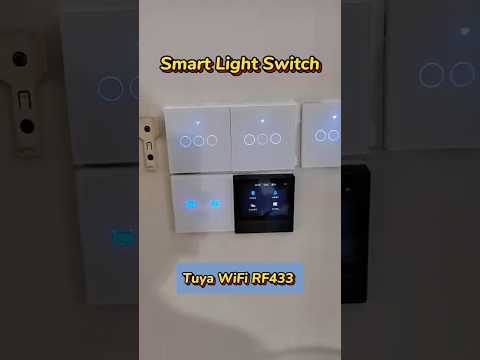
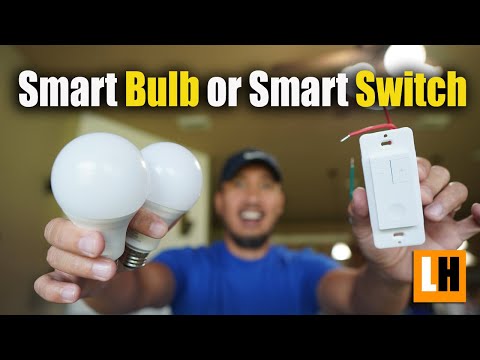
- Smart Switches and Dimmers: Replacing traditional wall switches with smart switches like the Lutron Caseta or TP-Link Kasa adds physical control points without sacrificing smart functionality. These are perfect for households with family members who prefer not to use apps.
- Automation and Schedules: Programming your lights to follow routines—such as gradually brightening at sunrise or dimming at bedtime—removes the need for manual interaction entirely.
- Remote Control and Integration with Third-Party Platforms: Services like IFTTT, Home Assistant, and Apple HomeKit allow advanced users to create custom automation chains that go far beyond basic on-off commands.
Benefits of Investing in Smart Lighting Control
The advantages of controlling smart lighting extend far beyond novelty. Here is why homeowners and businesses are making the switch in record numbers:

- Energy Efficiency: Smart lighting systems can reduce electricity consumption by up to 75 percent compared to traditional incandescent bulbs. Automated scheduling ensures lights are never left on unnecessarily.
- Convenience and Comfort: With a single tap or voice command, you can transform the entire mood of a room in seconds.
- Security Enhancement: Scheduled lighting patterns and vacation modes make your home appear occupied even when you are away, deterring potential intruders.
- Health and Wellness: Tunable white lights that adjust color temperature throughout the day support your natural circadian rhythm, improving sleep quality and daytime focus.
- Property Value: A fully integrated smart lighting system adds measurable appeal and perceived value to any property.
Comparison of Popular Smart Lighting Control Platforms
Choosing the right platform is one of the most important decisions when setting up your smart lighting ecosystem. The table below compares the major players to help you decide which fits your needs best.
| Platform | Best For | Voice Assistants | Matter Support | Price Range |
| Philips Hue | Color accuracy and ecosystem depth | Alexa, Google, Siri | Yes | Premium |
| LIFX | No hub required; rich colors | Alexa, Google | Yes | Premium |
| Wyze Bulb | Budget-friendly smart lighting | Alexa, Google | No | Affordable |
| Govee | LED strips and ambient lighting | Alexa, Google | No | Budget |
| Lutron Caseta | Whole-home switches and dimmers | Alexa, Google, Siri | No | Mid-Range |
How to Choose the Right Platform for You
If you want deep integration and the widest color palette, Philips Hue remains the gold standard. For users who want to skip a hub entirely, LIFX bulbs connect directly via Wi-Fi. Budget-conscious users will find Wyze and Govee to be excellent entry points that still deliver solid smart lighting control functionality. If your priority is reliable physical switches and dimmers across an entire home, Lutron Caseta offers unmatched reliability and professional-grade performance.
Getting Started: A Step-by-Step Setup Guide
Setting up your smart lighting control system does not have to be complicated. Follow this practical roadmap to get started:
- Define Your Goals: Decide whether you want simple on-off remote control, color-changing ambiance, or full home automation with schedules and sensors.
- Choose Your Ecosystem: Pick a platform that aligns with your goals, budget, and the voice assistant you already use.
- Start Small: Begin with one or two smart bulbs in the most-used room of your home to test the experience before scaling up.
- Set Up Your Hub (If Required): Some systems like Philips Hue require a bridge. Connect it to your router and follow the in-app instructions.
- Create Scenes and Automations: Once your lights are connected, create at least two or three scenes—such as “Movie Night,” “Morning Routine,” and “Away Mode”—to experience the real value of smart lighting control.
- Expand Gradually: Add smart switches, sensors, and additional rooms over time to build a cohesive whole-home system.
Expert Tips for Maximizing Your Smart Lighting Setup
Experienced smart home users know that the real magic happens when you go beyond the basics. Here are some professional-level tips to elevate your smart lighting control experience:
- Use Zigbee or Z-Wave for large setups: Wi-Fi networks can become congested with more than 20–30 smart devices. Mesh protocols like Zigbee distribute the load and provide more stable connections.
- Leverage geofencing: Set your lights to turn on automatically when you approach home and off when you leave, using your phone’s location services.
- Integrate with motion sensors: Pairing smart lights with motion sensors in hallways, bathrooms, and garages ensures lights activate only when needed, maximizing energy savings.
- Group lights logically: Instead of controlling every bulb individually, create room-based groups for simpler management and faster scene activation.
- Update firmware regularly: Keeping your smart bulbs and hubs updated ensures security patches, bug fixes, and access to new features.
- Use the Matter standard going forward: As Matter adoption grows, choosing Matter-compatible devices now future-proofs your investment and eliminates cross-platform compatibility headaches.

Common Mistakes to Avoid When Setting Up Smart Lighting Control
Even experienced users sometimes stumble when building their smart lighting systems. Here are pitfalls to watch out for:
- Buying incompatible devices without checking protocol support first.
- Overloading a Wi-Fi network with too many Wi-Fi-only devices.
- Skipping the hub when the system requires one, leading to unreliable connectivity.
- Ignoring firmware updates, which can leave your system vulnerable or unstable.
- Creating overly complex automations that become difficult to manage and troubleshoot.
Conclusion
Controlling smart lighting is no longer a luxury reserved for tech enthusiasts—it is an accessible, practical upgrade that enhances nearly every aspect of daily life. From energy savings and security to health-conscious lighting schedules and cinematic ambiance, the benefits of a well-designed smart lighting control system are substantial and immediate. By choosing the right platform, starting with a clear plan, and gradually expanding your setup, you can build an intelligent lighting environment that responds to your lifestyle rather than the other way around. The technology continues to evolve rapidly, especially with the arrival of the Matter standard, making now the perfect time to step into the world of smart lighting and take full control of how your spaces look, feel, and function.
Frequently Asked Questions
Can I control smart lighting without Wi-Fi?
Yes, many smart lighting systems support offline control through Bluetooth or a local hub. Systems like Philips Hue and Lutron Caseta allow basic on-off and dimming functions even when your internet connection drops, though advanced features like remote access and cloud-based automations require a working Wi-Fi network.
Is smart lighting control difficult to set up for beginners?
Not at all. Most modern smart lighting systems are designed with beginners in mind. Popular brands offer step-by-step app wizards, voice assistant integration guides, and pre-built automation templates that make the initial setup process straightforward and accessible for users of all technical skill levels.
What is the best way to control smart lighting in multiple rooms?
The most effective approach is using a combination of a centralized app, voice assistant commands, and room-based groups. Platforms like Philips Hue and Apple HomeKit allow you to organize lights by room, create cross-room scenes, and manage everything from a single dashboard for a unified control experience.
Are smart lighting control systems compatible with existing home wiring?
In most cases, yes. Smart bulbs screw into standard sockets and work with existing fixtures. Smart switches and dimmers replace traditional wall switches and typically require a neutral wire, though no-neutral options are available for older wiring configurations. Always check compatibility with your specific setup before purchasing.
What is the Matter protocol and why does it matter for smart lighting?
Matter is a new unified connectivity standard that allows smart lighting devices from different manufacturers to work together seamlessly across ecosystems like Apple HomeKit, Google Home, Amazon Alexa, and Samsung SmartThings. It eliminates the fragmentation that previously made mixing brands frustrating, giving users true freedom to choose the best devices regardless of brand.
How much energy can smart lighting control actually save?
Studies show that smart lighting control systems can reduce lighting energy consumption by 30 to 75 percent. This is achieved through automated scheduling that prevents lights from being left on, dimming capabilities that reduce power draw, and motion sensors that ensure lights activate only when a space is occupied. Over time, these savings translate into noticeably lower electricity bills.